Forgotten steps
Without a template, a review or a rights check gets skipped when the team is in a rush.

Automation runs your GEO operations: an agent that prepares and executes, reusable workflows, SSO and API for enterprise teams.
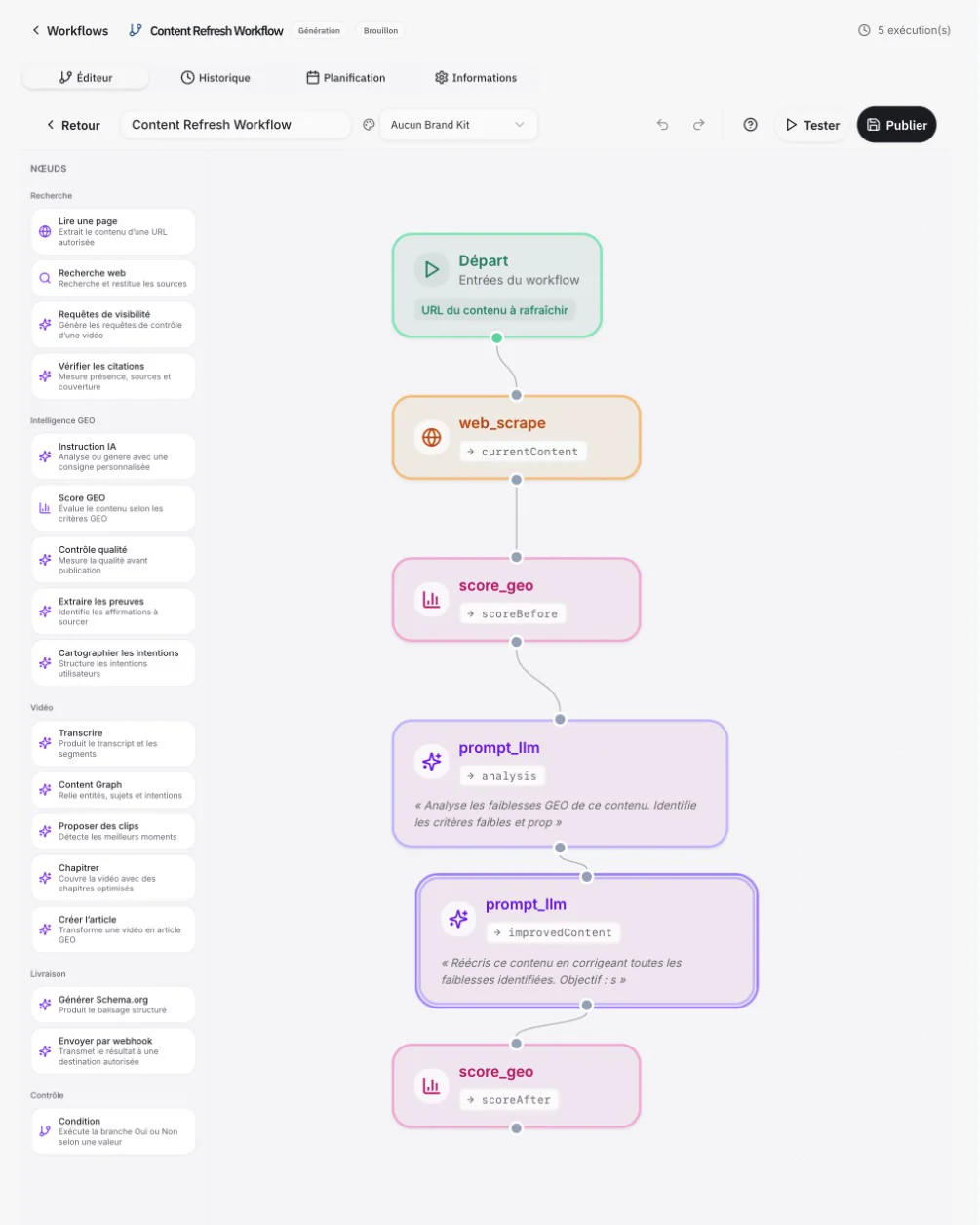
→ contentUrl → currentContent → scoreBefore → analysis “Analyse the GEO weaknesses of this content. Identify the weak criteria and suggest fixes.” → improvedContent “Rewrite this content fixing every weakness found. Target: GEO score ≥ 75.” → scoreAfter Run #6 succeeded · GEO score 54 → 81 · publishing awaits approval
The Aive GEO agent answers in natural language from your data, explains what is moving and suggests actions ranked by impact. Workflows turn those actions into executable sequences, node by node, with testing, scheduling and history. Enterprise features, SSO, roles, API and webhooks, fit it all into your organisation. Nothing is published without approval.
Without a template, a review or a rights check gets skipped when the team is in a rush.
The same operations are rerun for every video, every market and every client.
A script that publishes on its own, with no trace or approval, creates more risk than it removes.
Citations and sentiment per engine, sources, competitors, videos and timestamped moments: the agent answers from your data, suggests the actions that matter and runs the matching workflows. Demo data.
How can I improve my brand’s AI visibility?
Your brand is cited in 31% of tracked answers, up +4.2 pts over 7 days. ChatGPT and Perplexity mostly cite your product videos.
3 priority actions, ranked by expected impact:
Workflow started · awaiting approval
Everyday questions, answers with figures, actions ready to run.
Share of answers citing you, 7-day trend, the engines that cite you, then 3 prioritised actions.
The sources, pages and video moments that make the difference, question by question.
Timestamped moments from the Content Graph, with the target page and the format to produce.
Runs the Content Refresh workflow: score before and after, new version submitted for approval.
Transcript, chapters, suggested clips and article, ready for review.
Changes in citations, sentiment and sources, linked to the actions taken.
The agent acts with your workspace’s roles, modules and destinations.
Research, GEO intelligence, Video, Delivery and Control: everything needed to go from data to a published asset.
Illustrative examples; every template adapts to your steps, roles and destinations.
Read the page → score before → weakness analysis → rewrite → score after → condition → delivery after approval.
Transcribe → Content Graph → chapter → create the article → generate schema.org → quality check → delivery.
Visibility queries → check citations → “drop” condition → webhook alert, every week.
Editor, history, schedule and details; Playbook, testing and workflow publishing.
Your sources in (video libraries, DAM, PIM, analytics), your destinations out (CMS, socials, API), everything in between isolated, logged and under approval.
OpenAPI 3.1.0, keys, scopes, webhooks, logs and examples; access defined in the contract.
Dedicated SSO, roles and permissions, isolated workspaces.
Corrections, approvals, separation of duties and snapshots before any GEO publication.
CMS, analytics and e-commerce: status, capability and limits per connector.
No name implies general activation: every connector is tested and documented before it is announced as available. Capabilities and status per connector
Optimizations applied to your pages, previewed, rolled out progressively and reversible.
Buying guides, product FAQs and 360 product pages generated from your product videos.
Ad formats designed for AI answers, under governance.
How we measure, what every run makes readable, and what we never promise: Methodology
SOC 2 Type II · GDPR · ISO 27001 under way · client data never used to train models: Security
No. It prepares and runs workflows; publishing or sending to a destination always waits for approval from an authorised role.
From your workspace’s observations and analyses: tracked engines, questions, period and sources, shown with every answer.
Aive Expert answers your website visitors from your videos. The agent serves your teams: it analyses your visibility in AI answers and prepares the actions.
Yes, in the editor: Research, GEO intelligence, Video, Delivery and Control nodes, with testing, scheduling and history.
The run stops at that node and the error is logged in the history. Alerts and retries depend on configuration.
Yes, through the API or webhooks when enabled, with scopes, limits and support defined in the contract.
Compatibility is validated connector by connector: API version, connection test, tested capabilities and contractual availability.
Aive publishes a SOC 2 Type II report, GDPR compliance, encryption in transit and at rest, access controls and logs; the ISO 27001 process is under way. Client data is never used to train models. The Trust Center shows the current scope.
Your content, your rules, your approvals: see the agent and a workflow on a real case.